
Is WO Mic Safe to Download and Use in 2026? Complete Security Audit
Yes — the official WO Mic Windows Client and Virtual Device driver (v6.3) are safe, legitimate utilities that stream local PCM audio from your smartphone to your PC without uploading voice data to external servers. However, because older 2018–2021 builds shipped with an unsigned kernel driver and some third-party download portals wrapped the installer in adware bundles, users occasionally encounter Windows SmartScreen prompts or forum warnings.
1. Why Did Some Users See Antivirus or SmartScreen Warnings in the Past?
Understanding what WO Mic installs at the operating-system level explains why security software scrutinizes it more closely than a standard calculator app:
- Kernel-Mode Virtual Audio Miniport (
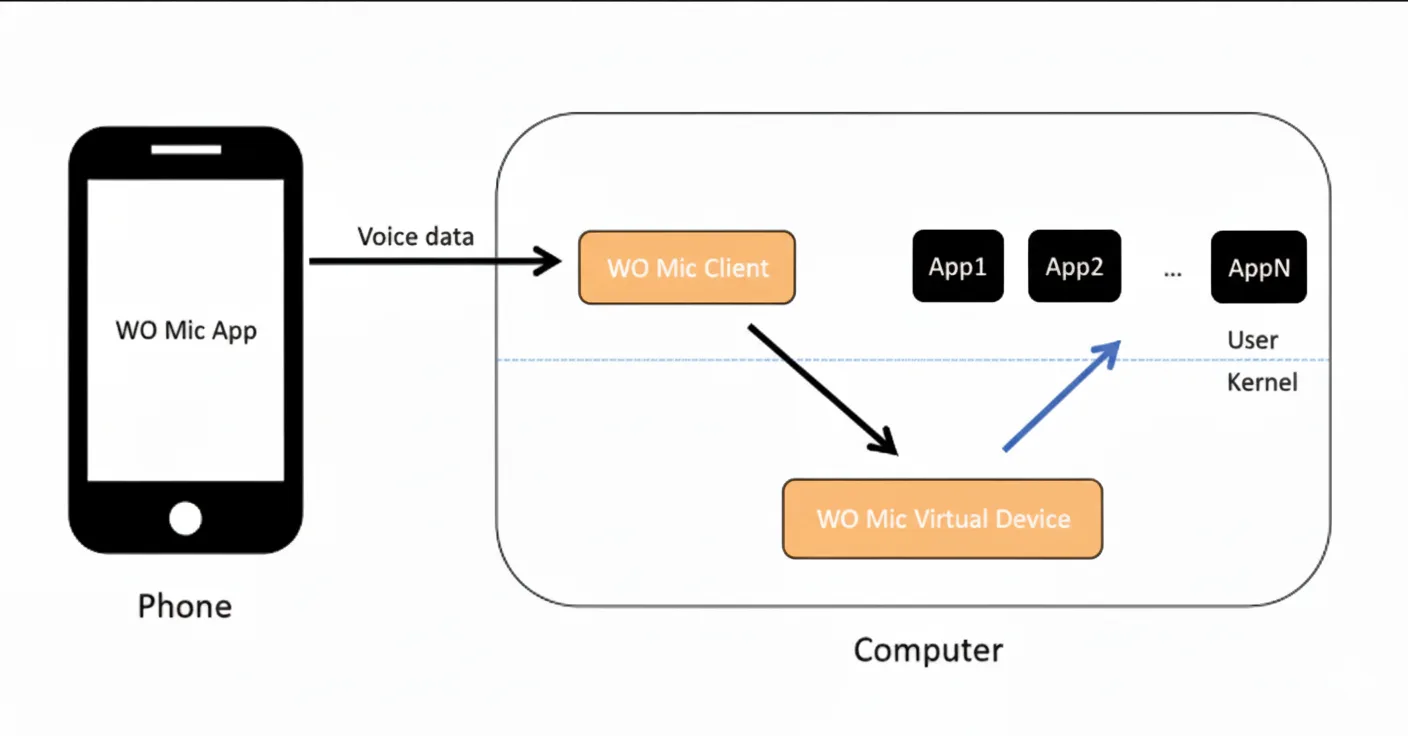
womic.sys): To make your phone appear as a hardware microphone inside Discord, OBS Studio, and Zoom, WO Mic installs a WDM audio driver intoC:\Windows\System32\drivers\womic.sys. In legacy versions prior to v6.3, the developer noted that the installer wrapper itself lacked an Extended Validation (EV) Authenticode signature, which automatically triggered Windows Defender SmartScreen's generic "Unknown Publisher" prompt. - Third-Party Repackagers & Fake Mirrors: Historically, users who downloaded WO Mic from unofficial torrent trackers or adware-injected download aggregators received modified installers containing bundled browser offers (flagged by antivirus heuristics as
PUA:Win32orOfferCore). Always install the clean v6.3 package from our verified WO Mic PC Download page. - Local UDP Port 8125 Listener: When using Wi-Fi transport,
WOMicClient.exeopens local UDP port8125to receive audio frames from your phone on your home LAN, which causes Windows Defender Firewall to display a standard network permission dialog on first run.
2. Technical Security & Network Footprint Matrix (v6.3)
| Security Dimension | Verified Behavior in WO Mic v6.3 | How to Verify Yourself |
|---|---|---|
| Audio Path & Cloud Privacy | 100% point-to-point local stream (USB ADB, LAN UDP, or Bluetooth) | Works with router WAN / internet cable unplugged |
| Installed Kernel Driver | Signed WDM miniport (womic.sys / womic.cat) | Check signature in Device Manager → WO Mic Device → Driver |
| Background Services | Zero background Windows services; runs only when launched | Verify in services.msc and Task Manager Startup tab |
| Mobile App Permissions | Microphone (Record Audio) + Local Network / Bluetooth only | Does not request Contacts, SMS, Photos, or GPS location |
3. Four-Step Checklist to Install and Use WO Mic Safely
- Verify the Source & Prerequisite Runtime: Download the official Microsoft x86 Visual C++ runtime and the clean v6.3 client from our WO Mic PC Client page, and install the mobile app from Google Play (Android APK Guide) or the Apple App Store (iOS Guide).
- Prefer USB Transport on Untrusted Wi-Fi Networks: On public, hotel, or university Wi-Fi networks, use a USB cable with Android USB Debugging rather than unencrypted UDP Wi-Fi so no other device on the shared Wi-Fi subnet can reach port 8125.
- Inspect the Virtual Driver Status: Follow our WO Mic Virtual Driver Guide to confirm the driver loads cleanly with UEFI Secure Boot enabled.
- How to Audit or Uninstall Completely: When you close
WOMicClient.exe, all network sockets close immediately. To remove both the client and kernel driver permanently, run the uninstaller in Windows Settings → Apps and tick Delete driver software in Device Manager.
Frequently Asked Questions
Does WO Mic record or send my conversations to a cloud server?
No. WO Mic streams raw PCM audio directly from your phone IP to your PC IP (or over your physical USB cable). You can disconnect your router from the internet entirely and WO Mic will continue working at full speed.
Is enabling USB Debugging for WO Mic a security risk?
USB Debugging is protected by RSA-2048 cryptographic key pairing. Only the specific PC whose RSA fingerprint you manually approve on your unlocked phone screen can communicate with the phone.
Why did Windows show 'Windows protected your PC' when I double-clicked the setup?
Microsoft Defender SmartScreen shows that prompt for standalone Win32 installers distributed outside the Microsoft Store. Click 'More info' to verify the file and click 'Run anyway'.
Are there open-source alternatives to WO Mic if my company blocks third-party kernel drivers?
Yes. Check our comparison of the 12 Best WO Mic Alternatives (including SonoBus and AudioRelay) for options that work on locked-down corporate machines.